Registration follow-up emails send a set amount of time after someone registers, rather than counting down to your event. Run several on one session and you have a drip campaign against your registration list — an owned channel to a highly engaged audience for the whole stretch between signup and showtime, to drive attendance and engagement with everything else you have.
An engagement channel, not just a reminder
Someone who has just registered is, briefly, more interested in your topic than they will be at any other moment — and for the next few weeks you have permission to talk to them about it.
Each touch also tells you who is engaged, so by the time you go live you know far more about the room than the registration form told you.
Anchored to the person, not the event
Reminders count down to your start time — the same moment for everybody. Follow-ups start their clock when each registration is confirmed, so everyone travels the same path at the same pace, whether they signed up eight weeks out or yesterday.
| When it sends | Anchored to | |
|---|---|---|
| Confirmation | The moment a registration is confirmed | The person |
| Reminder | A set time before your session starts | Your event |
| Follow-up | A set time after each person registers | The person |
Three sequences to build
Build the first, copy it, and change the timing.
- 15 minutesAgenda, speakers and the calendar file
- 2 daysMeet your speaker — a short bio or clip
- 1 weekWhat would you like us to cover?
- 1 hourYour best primer on the topic
- 3 daysHow another team solved this
- 1 weekA low-friction invitation to talk
- 1 dayThree on-demand sessions on the same theme
- 5 daysAn invitation to the full series
Any of them can be limited to a segment, so an enterprise audience and a self-serve audience run different tracks on the same session.
What it looks like in practice
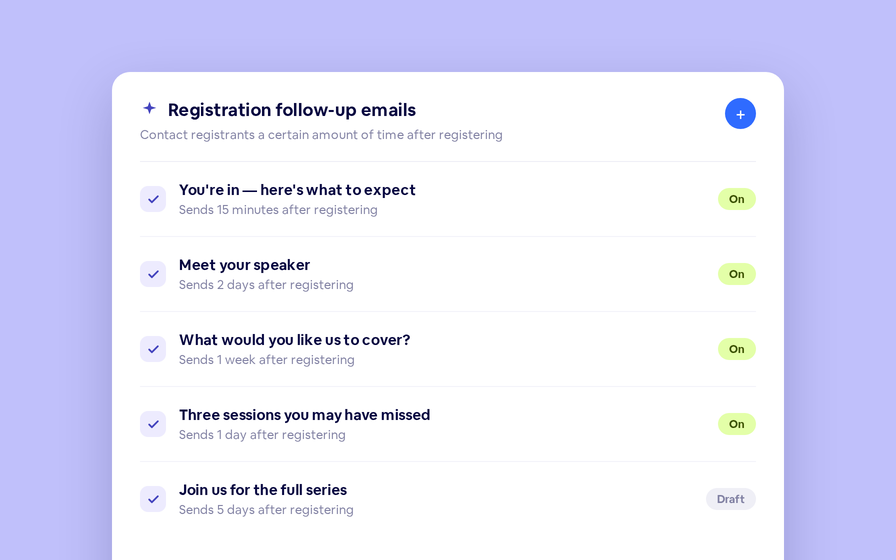
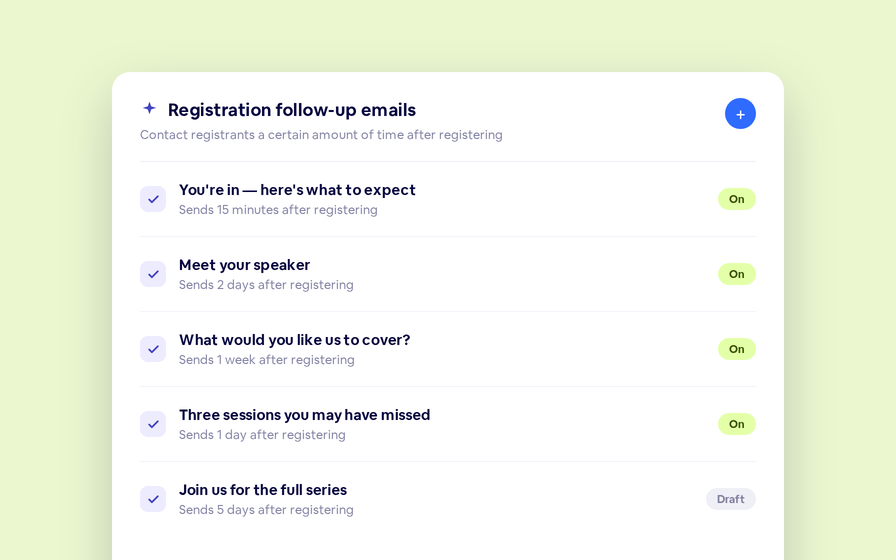
Say you open registration six weeks before a product webinar, and someone signs up on the first day. Here is everything they receive, and when, without anyone touching a send button.
✦ Registration follow-up emails
Contact registrants a certain amount of time after registering
A five-step sequence on one session. Each email states its own timing, so the whole run reads as a list.
Someone who registers three weeks later gets exactly the same run, three weeks later. And someone who signs up on the morning of the event receives none of it — their cutoff has already passed, so they go straight to the reminder.
How it works
Follow-ups live in Emails → Registration, between your confirmation email and your reminders.
| Setting | What it does |
|---|---|
| Delay | How long after registration the email sends. This is your drip cadence. |
| Cutoff | A hard stop. Anyone whose email would land after it is never enrolled. |
| Segment | Optional. Limits the email to part of your registration list. |
The cutoff is what makes a drip safe to run unattended: if someone’s email would land after it, they are never added to the sequence. Set it as a stretch of time before your session starts, or as a fixed date.
Follow-ups enrol only the people who register after you switch them on — deliberately, so that enabling a sequence on a large event cannot fire thousands of emails at once.