Most integrations only reach the platforms somebody built a connector for — and the system you actually need is never on the list. Custom API Export removes the list. Point a session at any HTTP endpoint, write the JSON body yourself, and BigMarker calls it as the session is created, as people register and cancel, when the session ends, and when someone watches the recording. No middleware, no CSV hand-off, and no waiting on a connector to be built.
No connector required
Every other integration on the Integrations tab is a fixed connection to one product, with a field map someone at BigMarker decided on. This one has no field map at all. You choose the method, you type the request URL, and you write the JSON body — so the message that leaves BigMarker is already the message your system accepts.
That covers the data warehouse, the event mesh, the internal CRM, the regional marketing platform, the homegrown service nobody else integrates with. If it speaks HTTP, it is in scope.
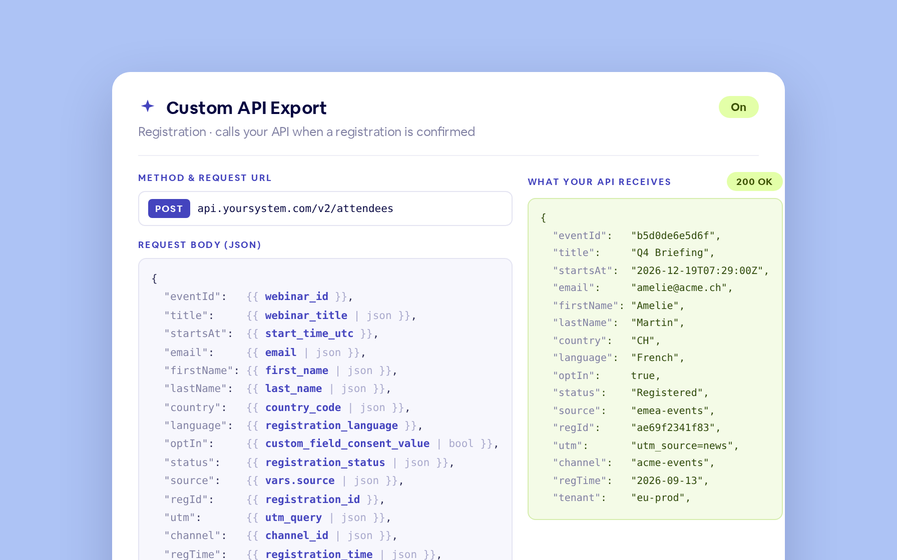
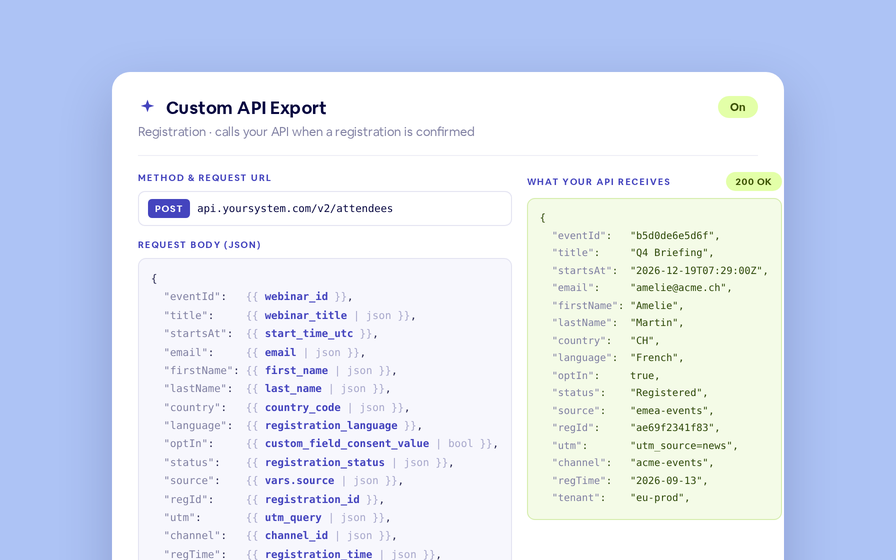
Calls the API once for each registrant when their registration is confirmed.
https://api.yoursystem.com/v2/events/{{ webinar_id }}/attendees{
"eventId": {{ webinar_id | json }},
"email": {{ email | json }},
"name": {{ first_name | json }},
"country": {{ country_code | json }},
"optIn": {{ custom_field_consent_value | bool }},
"source": {{ vars.source | json }}
}{
"eventId": "b5d0de6e5d6f",
"email": "amelie@example.com",
"name": "Amelie",
"country": "CH",
"optIn": true,
"source": "bigmarker-emea"
}The Registration section of a Custom API Export integration, with a live preview of the body it will send.
Five moments, five separate calls
The integration is not one firehose. It is five sections, each with its own switch, its own request URL and its own body — so a registration can go to one endpoint and attendance to another, and you can turn one off without touching the rest.
| Section | Calls the API when… | Volume |
|---|---|---|
| Session | This session is created or edited, and again when it ends. | one message per session |
| Registration | A registrant’s registration is confirmed — after payment, approval or double opt-in. | one message per registrant |
| Cancellation | A registrant cancels, from the cancellation link, the Audience page or the API. | one message per canceled registrant |
| Attendance | The session ends: attended if they joined the live room, otherwise a no-show. | every registrant, when the session ends |
| On-Demand View | A registrant watches the recording for the first time. | one message per recording viewer |
There is also Export all, which re-sends everything you already have with its current status — the way to backfill a system you connected after the fact.
Everything you know about the session is a variable
The body is a template, so any value BigMarker holds can be dropped into it: the session, the person, where they came from, and every registration field on your own form.
Filters keep the JSON valid whatever the data does: | json quotes a text value and writes null when it is empty, | bool turns a Yes/No answer into a real JSON true or false, and | default, | date and | truncate handle the rest. An empty field can never break the payload.
See the exact request before it goes anywhere
- ChecksThat the token endpoint or API key actually authenticates, before you write a single template.
- RendersThe request URL and body filled in with a real session and a real registrant, so you see the payload as your API will.
- SendsA single message to your endpoint and shows you the status code and the response body that came back.
Once it is live, the Call Log keeps every request and response for the session, so a failure is something you can open and read rather than guess at. Timeouts and 5xx responses retry on their own — five attempts, backing off one, two, four and eight minutes — so a brief outage on your side does not cost you the data.
Change environments without editing a template
Anything that differs between staging and production — a host, a tenant id, a source name — goes in API Variables and is referenced as vars.name in the URL and body. Moving an integration between environments is then a change of values and credentials, never of templates.
And when you have a setup that works, save it as a channel preset and load it onto the next session in one click, credentials included.
Custom API Export is available on Enterprise and Virtual Event plans. Find it on a session under Integrations → Custom API Export. It is set up per session and carries across copies, and it supports one-off sessions today — series, recurring sessions and 24-7 rooms are not covered yet.